A MySQL database contains tables, indexes, views, and more. However, even with preventive measures in place, database corruption and data loss can still occur. When the database becomes corrupted, you face random errors or the MySQL service may fail to start entirely. Therefore, repairing corrupt database files quickly is critical for continuous workflow.
For quick database repair and recovery, you can opt for a professional MySQL repair tool. As a large number of MySQL database recovery tools are available, choosing the right one can be difficult. This article explores the most popular and effective MySQL repair tools, and explains their strengths and weaknesses to help you select the best tool for your needs.
Top 5 MySQL Repair Tools in 2026
Here are the 5 best MySQL repair software that are easy-to-use and offer various useful features.
1 – Stellar Repair for MySQL
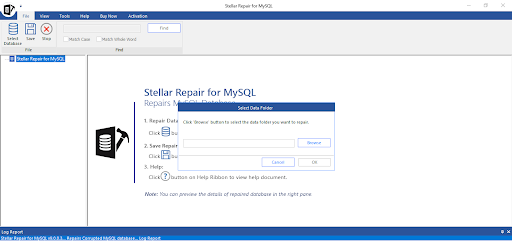
Stellar Repair for MySQLs an advanced MySQL database repair tool that can quickly repair corrupted or damaged InnoDB/MyISAM tables with ease. It can efficiently recover all the data from the severely corrupted .frm, .ibdata, .ibd, .myd, and .myi files, with complete integrity. It can also repair and recover data from a MariaDB database. It can repair multiple MySQL database files and even supports repairing partitioned tables. The download and installation process of the tool is easy. It works seamlessly with InnoDB and MyISAM tables created in MySQL versions 5.0 to 5.7.44, 8.0.40 to 8.0.44, and 9.4.0 to 9.5.0.
Pros
-
Supports repairing of both InnoDB and MyISAM tables.
-
Quickly repairs MySQL tables including partitioned tables.
-
Easily recovers MySQL database files (.frm, .ibdata1, .ibd, .myd, .myi) with complete integrity.
-
Maintains database integrity, including properties like auto-increment, default values, constraints during the repair.
-
Compatible with Linux versions like Ubuntu 16.04 (32-bit & 64-bit).
-
Offers a simple user interface.
-
Repairs MySQL database without any size limitations.
-
Fixes complex corruption-related errors.
-
Allows to preview all the recoverable data of the MySQL database after repair.
-
Generates a detailed log report of the entire database repairing process.
-
Supports all Windows editions, including the latest Windows 11.
-
Supports MySQL Server versions – from 5.0 to 5.7.44, 8.0.40 to 8.0.44, and 9.4.0 to 9.5.0.
-
Supports MariaDB up to 11.8.3.
-
Allows to repair multiple MySQL database files in a single go.
-
Demo version is available to check the tool’s functionality before purchase.
Cons
-
The demo version allows you to scan and preview the MySQL database for free, however, to save the recovered data, you must purchase the license.
-
It does not support current Ubuntu versions (20.04, 22.04, 24.04)
Stellar also offers online MySQL repair service, which helps you repair databases directly from the web browser without requiring a MySQL Server. This supports both InnoDB and MyISAM storage engines. It even allows you to preview your recovered database tables and review precise record counts before saving the repaired file. This service comes with a free plan for repairing database file of up to 500 MB, and a Premium plan to repair file of up to 5 GB.
2 – Aryson MySQL Database Repair Tool
Aryson MySQL Database Repair Tool is a powerful tool to repair corrupt MySQL database files efficiently. It supports tables created in InnoDB and MyISAM storage engines. It ensures complete data recovery including keys, data types, and table properties. The tool also supports repairing databases created in MariaDB. It allows you to save the recovered the data in SQL script file format. You can even restore the repaired database directly to a live MySQL Server environment.

Pros
-
Simple and user-friendly interface.
-
Repairs InnoDB/MyISAM tables with complete integrity.
-
Allows you to scan and select the specific tables.
-
Displays a structured data preview after scanning, letting you verify the integrity of tables.
-
Supports MySQL database versions from 5.5.27 to 5.7.36.
-
Recovers table properties, keys, relationship constraints of both InnoDB (.frm, .ibdata, .ibd) and MyISAM (.frm, .myd, .myi) files.
-
Demo version is available to check the recoverable data in corrupt MySQL database.
Cons
-
It does not support the Linux system.
-
It does not repair MySQL database files in batch.
-
It does not support repairing partitioned tables in MySQL database.
-
The demo version of the tool only allows you to preview the recoverable objects.
3 – SysInfo MySQL Database Recovery
SysInfo MySQL Database Recovery Tool is also one of the widely used MySQL repair tools. It provides an intuitive interface to allow users to repair MySQL database without requiring technical expertise. It recovers all the data from database files including views, triggers, data types, and tables. It supports MySQL Version 8.0, 6.0, and earlier versions with complete integrity. Also, it allows you to preview the recoverable objects in the database before saving.

Pros
-
Easily recovers tables created with popular MySQL storage engines.
-
Recovers corrupt MySQL database files (.myd, .frm, and .myi) with precision.
-
Recovers objects like views, tables, keys, and triggers from corrupt MySQL database.
-
Offers an intuitive interface to ease the recovery process.
-
Supports all the MySQL versions – 8.0, 6.0, 5.7, and earlier.
-
Repair MySQL database file in bulk.
-
The demo version allows you to save 25 records/tables for free.
Cons:
-
It does not support JSON/BLOB/Vector/MEDIUMTEXT.
-
It does not allow you to export the repaired MySQL to XLS/Excel/MariaDB.
-
It does not support repairing MariaDB databases.
-
It does not provide a Toolkit tier for cross-DB migration (MySQL/SQL/Access/SQLite).
-
It does not repair partitioned tables.
4 – Cigati MySQL Database Repair Tool
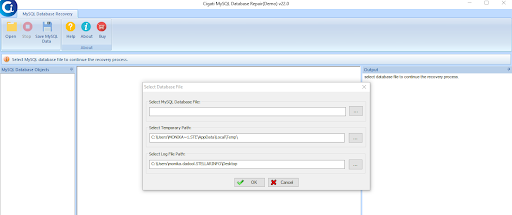
Cigati MySQL Database Repair Tool is also one of the reliable database recovery tools to repair and restore MySQL database. It supports both MyISAM and InnoDB tables files. It can repair multiple corrupt database files created in MySQL version 5.5 through 8.4. It allows you to save the recovered data to live MySQL instance. The tool’s free demo version helps you to check how it works. It provides a detailed preview of recovered objects.
Pros
-
Allows to repair InnoDB and MyISAM database files.
-
Easily resolves broken or damaged .frm, .myd, and .myi files.
-
Helps recover corrupt tables, data types, table properties, views, and keys.
-
Provides an option to save the restored data as SQL script.
-
Compatible with Windows operation systems.
Cons
-
It does not support Linux system.
-
It does not support repairing foreign keys and partitioned tables.
-
It does not allow to export the repaired MySQL database to XLS/Excel/HTML/MariaDB
-
The demo version allows only to preview recovered MySQL database objects.
5 – Recovery Toolbox for MySQL
Recovery Toolbox for MySQL is a user-friendly MySQL recovery tool designed to repair MySQL tables and other data, including keys and indexes. It helps you restore all the objects of the InnoDB/MyISAM database files while maintaining original formatting. It even helps you save the repaired data as SQL script or export it directly to MySQL. It supports repairing primary keys, foreign keys, indexes, views, etc. You can even selectively save the tables or other objects.

Pros
-
Repairs tables created in InnoDB and MyISAM storage engines.
-
Let’s you check or uncheck specific tables to restore only what you need.
-
Allows to export repaired data as offline .sql script files or export it to live MySQL Server.
-
Demo version to check table structures and data counts inside the interface before saving.
Cons
-
Does not support repairing of MariaDB database.
-
Demo version shows only data previews. You need to purchase a license to save or export the recovered data.
-
Can’t save recovered tables directly to Excel or CSV format.
-
Does not support repairing multiple files in a single go.
-
Does not support Linux system.
-
Does not support repairing foreign keys and partitioned tables.
Comparison Table – Top 5 MySQL Repair Tools
|
Feature |
Stellar Repair for MySQL |
Aryson MySQL Database Repair Tool |
SysInfo MySQL Database Recovery Tool |
Cigati MySQL Database Repair |
Recovery Toolbox for MySQL |
|
File Types Supported |
.frm, .ibdata, .ibd, .myd, .myi |
.frm, .myd, .myi, .ibdata, .ibd |
.frm, .myd, .myi |
.frm, .myd, .myi, .ibdata, .ibd |
.frm, .myd, .myi, .ibdata, .ibd |
|
Storage Engine Support |
InnoDB & MyISAM |
InnoDB & MyISAM |
InnoDB & MyISAM |
InnoDB & MyISAM |
InnoDB & MyISAM |
|
Table Properties |
Yes – auto-increment, default values, constraints |
Yes – column settings, default values, auto-increment |
Yes – column settings and default values |
Yes – constraints, column settings, keys |
Yes – column types, keys, structures |
|
Partitioned Table support |
Yes (Range, Hash, List, Linear) |
No |
No |
No |
No |
|
Operating System |
Windows & Linux |
Windows |
Windows |
Windows |
Windows |
|
MySQL Log Analyzer / Forensics |
Yes |
No |
No |
No |
No |
|
Multi-product Toolkit Bundle |
Yes |
No |
No |
No |
No |
|
Online Repair / Cloud Tool |
Yes |
No |
No |
No |
No |
|
Total Export Formats |
5 formats MySQL Live Server, SQL Script, CSV, HTML, XLS |
2 Formats SQL Script, Live MySQL |
3 Formats SQL Script, Live MySQL Server, CSV |
2 Formats SQL Script, Live MySQL |
2 Formats SQL Script, Live MySQL |
|
Export as SQL Script |
Yes |
Yes |
Yes |
Yes |
Yes |
|
Ease of Use |
High |
High |
Moderate |
High |
High |
Verdict: Which Free MySQL Recovery Tool to Choose
We have discussed top MySQL repair tools to help you resolve corruption issues in MySQL database files. Aryson, SysInfo, Cigati, and Recovery Toolbox are reliable, Windows-exclusive tools for InnoDB and MyISAM table recovery and exporting data as text-based SQL scripts. However, Stellar Repair for MySQL provides additional features like partitioned table repair and multiple export formats. The ideal choice depends on whether you need a simple database repair or also the advanced recovery features.